

TL;DR:
- A home backup power station setup uses a portable power station connected through a transfer switch to keep essential circuits running during outages. The system can back up 6 to 12 circuits with quick switchover times, protecting sensitive electronics and providing cost-effective security. Proper load prioritization, safe installation, and load management are key to reliable operation and extended runtime.
A backup power station home circuit setup is defined as a portable power station connected to your home’s electrical panel through a transfer switch, allowing selected household circuits to stay powered during an outage. Systems using smart panels or transfer switches can back up 6 to 12 essential circuits with switchover times under 30 milliseconds. That speed protects sensitive electronics like computers, medical devices, and smart home hubs from damaging power interruptions. The industry term for this configuration is a “managed circuit backup system,” and it sits between a simple plug-in power station and a full fixed home battery installation. For homeowners and renters who want real security without a $10,000+ installation bill, this approach delivers the most practical value in 2026.
What equipment do you need for a backup power station home circuit?
The core components of a home circuit backup system are a portable power station, a transfer switch, and the wiring to connect them safely. Without a transfer switch or smart panel, a portable power station can only power devices plugged directly into its outlets. Seamless circuit-level backup requires hardware that integrates the station with your home’s electrical panel.
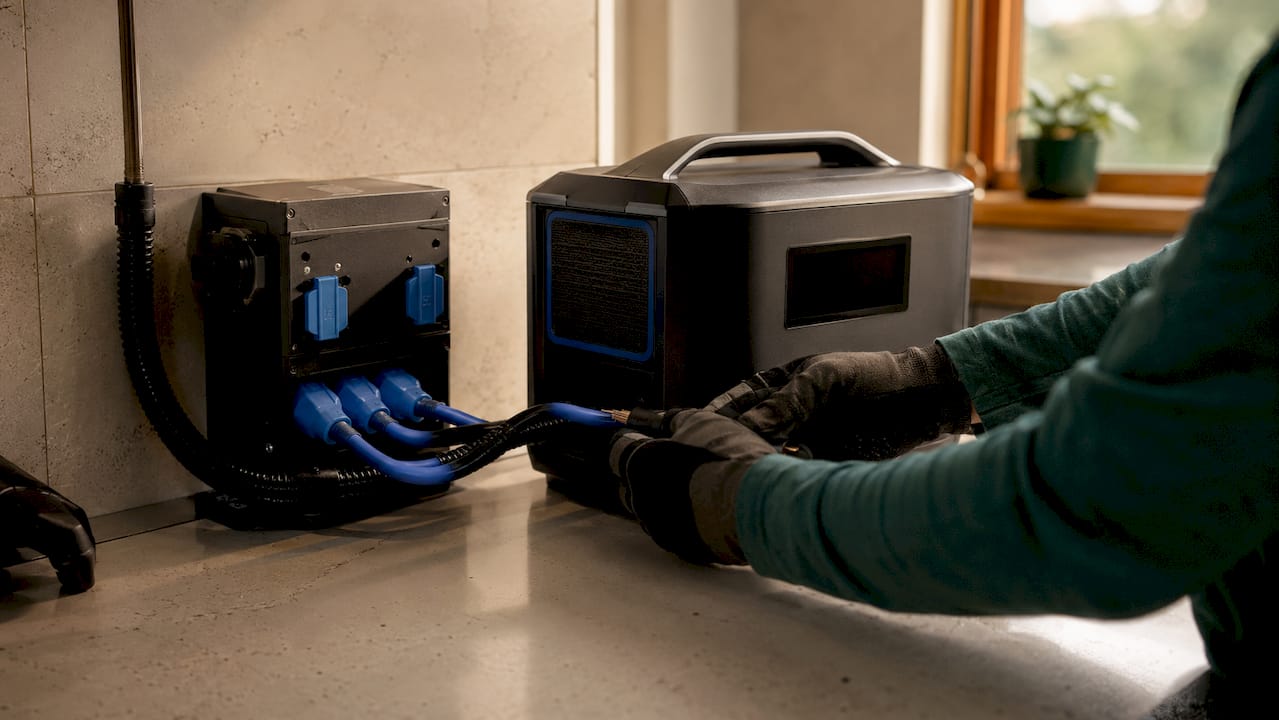
Here is a breakdown of the key equipment categories and typical cost ranges:
| Equipment | Function | Typical Cost Range |
|---|---|---|
| Portable power station (1–5 kWh) | Stores and delivers AC power to circuits | $500–$2,000 |
| Expansion battery pack | Increases total capacity for longer runtime | $800–$2,500 |
| Manual transfer switch | Isolates circuits and routes power from station | $200–$600 |
| Smart sub-panel | Automates circuit switching during outages | $500–$1,500 |
| Installation labor (if hired) | Wiring, panel work, code compliance | $300–$1,000 |
Professional installed systems cost $10,000–$20,000, while a portable configuration with a transfer switch runs $200–$4,000. That cost gap is the main reason homeowners are choosing portable setups for essential-load backup.
When selecting a portable power station, pay attention to output wattage, not just battery capacity. A unit rated at 2,000W continuous output can run a refrigerator, furnace blower, and several lights simultaneously. LiFePO4 battery chemistry is the preferred choice for home use because it tolerates more charge cycles and handles heat more safely than older lithium-ion designs.
- Portable power station: Choose a unit with at least 1,500Wh capacity and 2,000W AC output for meaningful circuit coverage.
- Transfer switch: A manual transfer switch works for most homeowners; a smart panel adds automatic switching.
- Wiring and connectors: Use appropriately rated cables and connectors specified for your panel’s amperage.
- Safety gear: Insulated gloves, a non-contact voltage tester, and a circuit breaker lockout kit are non-negotiable before touching any panel work.
Pro Tip: Read the portable power station guide before purchasing to understand output ratings, battery chemistry differences, and which specs actually matter for home circuit backup.
How do you plan and prioritize your home circuits for backup?
Circuit prioritization is the most important planning step, and most homeowners skip it. Effective load management starts with identifying which circuits are life-safety or comfort essentials and which are conveniences you can live without during an outage.
A practical way to think about it: divide your circuits into two groups. The first group contains circuits you cannot safely go without. The second group contains everything else.
- Refrigerator circuit: Keeps food safe and medications cold. Typically draws 100–200W running, with startup surges up to 800W.
- Furnace blower or HVAC fan: Circulates heat or cooling. The blower motor usually draws 300–600W.
- Sump pump: Prevents basement flooding during storms, which are the most common cause of outages. Draws 300–800W with high startup surge.
- Lighting circuits: Select one or two circuits covering kitchen, hallways, and bedrooms. LED lighting draws very little power.
- Communication and charging circuits: Outlets for phones, routers, and modems keep you connected to emergency information.
- Medical equipment circuits: CPAP machines, oxygen concentrators, or other medical devices belong in the first priority group.
Once you have your list, add up the running wattage of all selected circuits. That total must stay below your power station’s continuous output rating. Cumulative load estimation prevents overload and extends battery runtime significantly. A good rule: keep your active load at 70% or less of the station’s rated output to avoid thermal throttling.
Pro Tip: Label every circuit in your electrical panel clearly before any backup work begins. Clear labels prevent dangerous mistakes during a stressful nighttime outage.
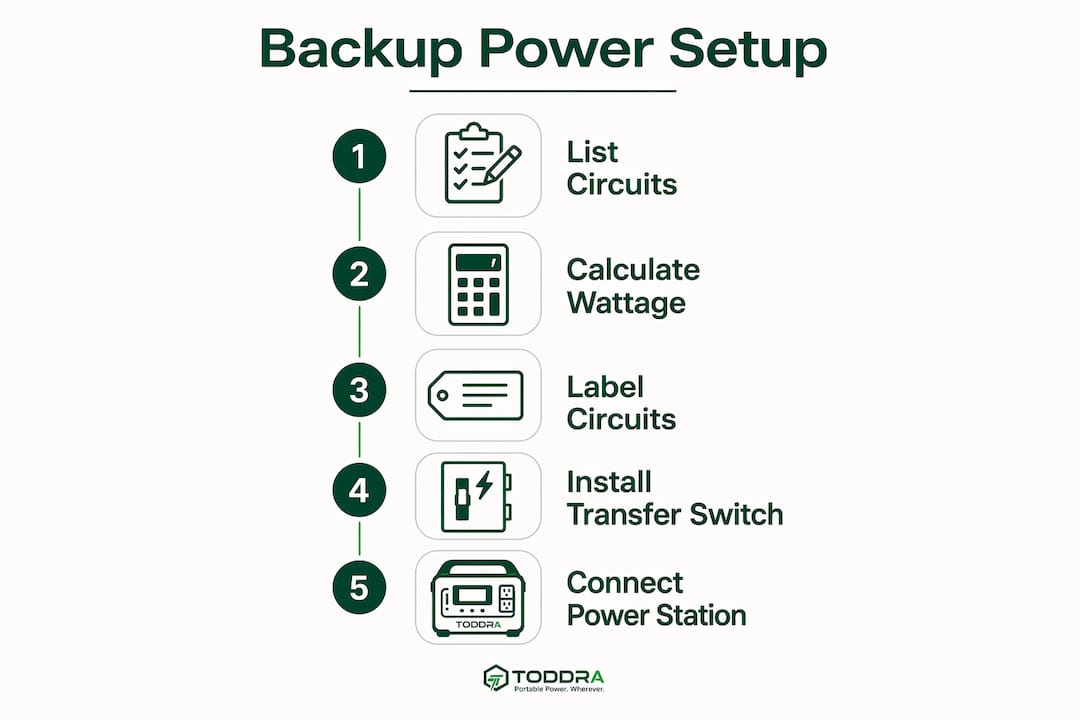
Safety matters here beyond just load math. Never modify your electrical panel without shutting off the main breaker first. If your panel is older than 20 years or uses fuses instead of breakers, consult a licensed electrician before proceeding.
How do you connect a backup power station to home circuits safely?
The installation sequence matters as much as the hardware. Proper power sequencing and breaker management prevent equipment damage and protect you from electrical hazards.
Follow this sequence for a manual transfer switch setup:
- Shut off the main breaker at your electrical panel. Confirm power is off with a non-contact voltage tester before touching any wiring.
- Install the transfer switch on the circuits you have prioritized. The transfer switch connects between your main panel and the selected circuit breakers.
- Run the power cable from the transfer switch to the power station’s AC input or output port, using the correct gauge wire for your amperage.
- Label all connections clearly, including which circuits are on backup and which remain on grid power.
- Power on the portable power station and confirm it is outputting AC power before switching the transfer switch to backup mode.
- Flip the transfer switch to the backup position. Your selected circuits now draw power from the station.
- Verify each circuit by checking that lights turn on and refrigerator compressors start without tripping the station’s overload protection.
Transfer switches create a hard physical barrier that prevents power from flowing back into the utility grid. Backfeeding is a severe hazard that can electrocute utility workers restoring power on the line. This safety step is not optional, and installation errors here are code violations with serious legal and safety consequences. When in doubt, hire a licensed electrician for the panel work.
For smart panel setups, the process is similar but the panel handles switching automatically when it detects a grid outage. Automatic switching eliminates the need to manually flip breakers during an outage, which is a meaningful advantage at 2 AM during a storm.
Common troubleshooting issues include the power station tripping its overload protection on startup. This usually means a high-surge appliance like a sump pump or refrigerator compressor is starting simultaneously. The fix is to stagger startup: turn on one circuit at a time and let each appliance reach steady-state operation before adding the next load.
How do you maintain and maximize runtime during an outage?
A 10 kWh battery system running essential loads like a refrigerator, lights, and internet can last 12–24 hours. A 20 kWh system supporting full home loads including HVAC runs approximately 12–16 hours. Runtime depends entirely on how well you manage your active load.
These practices extend runtime and protect your battery:
- Monitor load in real time. Most quality portable power stations include a display or companion app showing current draw in watts. Watch this number and shed non-essential loads when it climbs too high.
- Use load shedding deliberately. Turn off the furnace blower during mild weather. Unplug device chargers not in active use. Each watt saved extends your runtime.
- Charge with solar panels when possible. A 200W solar panel array can add meaningful capacity during a daytime outage, especially in summer. Solar input does not fully replace grid charging but meaningfully extends your window.
- Avoid deep discharging LiFePO4 batteries. Keeping charge above 10% protects cell longevity. Most modern stations alert you before hitting critical levels.
- Inspect connections quarterly. Loose connections generate heat and reduce efficiency. Check cable connections at the transfer switch and power station ports every few months.
The portable power station advantage for renters and homeowners avoiding permits is real: plug-and-play setups require no permanent wiring and no utility approval. The tradeoff is that they do not match the automatic whole-home coverage of a fixed battery system. Knowing that tradeoff upfront helps you set realistic expectations and plan your load strategy accordingly.
Key Takeaways
A backup power station home circuit setup is the most cost-effective way to protect essential household circuits during outages, provided you use a transfer switch, manage your load carefully, and follow electrical safety codes.
| Point | Details |
|---|---|
| Transfer switch is required | Without one, a portable power station cannot back up home circuits automatically or safely. |
| Prioritize 6–12 circuits | Focus on refrigerator, furnace blower, sump pump, lighting, and communication devices first. |
| Cost advantage is significant | Portable setups cost $200–$4,000 versus $10,000–$20,000 for professionally installed fixed systems. |
| Load management extends runtime | Keeping active load at 70% or less of rated output prevents overload and maximizes battery hours. |
| Backfeed prevention is non-negotiable | Transfer switches protect utility workers and are required by electrical code in every US state. |
Why I think most homeowners underestimate this setup
Most articles about home backup power focus on the hardware specs and skip the part that actually determines whether your system works when you need it. Load planning is where most setups fail. I have seen homeowners buy a capable power station, wire it to a transfer switch correctly, and then watch it trip offline 10 minutes into an outage because they tried to run too many circuits at once.
The honest truth is that portable power stations are not a replacement for a fixed home battery system if you want whole-home coverage. They are a genuinely excellent solution for essential-load backup at a fraction of the cost. That distinction matters. If you go in expecting to run your entire home, you will be disappointed. If you go in expecting to keep your refrigerator cold, your furnace running, and your phone charged through a 24-hour outage, you will be very satisfied.
The other thing I feel strongly about is the safety piece. Transfer switch installation is not a weekend DIY project for someone who has never worked inside an electrical panel. The backfeed risk is real and the consequences are severe. Spend the money on a licensed electrician for the panel work. Do the load planning and circuit prioritization yourself. That division of labor gets you a safe, reliable system without overpaying for the whole job.
The ROI on home battery backup is also better than most people realize when you factor in food spoilage, hotel costs during extended outages, and the peace of mind of knowing your sump pump will run through a storm. This setup is worth doing right.
— Jackson
Reliable home circuit backup starts with the right power station
Toddra carries a carefully selected range of portable power stations and compatible accessories built for exactly this kind of home circuit backup setup.
The Jackery Battery Pack 5000 Plus expansion battery adds 5,040Wh of capacity to a compatible base station, giving you the runtime to cover essential circuits through a full day and night. For homeowners who want a reliable mid-capacity option, the Jackery Explorer 1500 v2 delivers 1,536Wh and 2,000W of AC output, enough to run a refrigerator, furnace blower, and lighting simultaneously. Toddra also carries the Jackery Manual Transfer Switch for homeowners ready to connect their power station directly to home circuits. US-based customer support is available to help you choose the right configuration for your home.
FAQ
What is a backup power station home circuit setup?
A backup power station home circuit setup connects a portable power station to selected household circuits through a transfer switch, allowing those circuits to run on battery power during a grid outage. Systems with smart panels can switch over in under 30 milliseconds, protecting sensitive electronics.
How many circuits can a portable power station back up?
A portable power station integrated with a smart panel or transfer switch can typically back up 6–12 essential circuits. The exact number depends on the station’s output wattage and the combined load of the selected circuits.
Do I need an electrician to install a transfer switch?
Transfer switch installation involves working inside your home’s electrical panel and must comply with local electrical codes. Most jurisdictions require a licensed electrician for this work, and improper installation creates a serious backfeed hazard for utility workers.
How long will a portable power station run my essential circuits?
A 10 kWh system running a refrigerator, lights, and internet typically lasts 12–24 hours. Runtime depends on your active load, so shedding non-essential circuits and adding solar charging can extend that window considerably.
Can renters use a portable power station for home circuit backup?
Renters can use plug-and-play portable power stations for device-level backup without any panel modifications. Circuit-level backup with a transfer switch requires panel access, which typically needs landlord approval and a licensed electrician.